

In my previous article I covered the Backend For Frontend (BFF) pattern — why SPAs shouldn’t handle OAuth tokens directly. This week: how to actually deploy it on AWS.
The Goal
One domain. Static frontend and BFF backend. Internal APIs completely hidden from the internet.
The Architecture
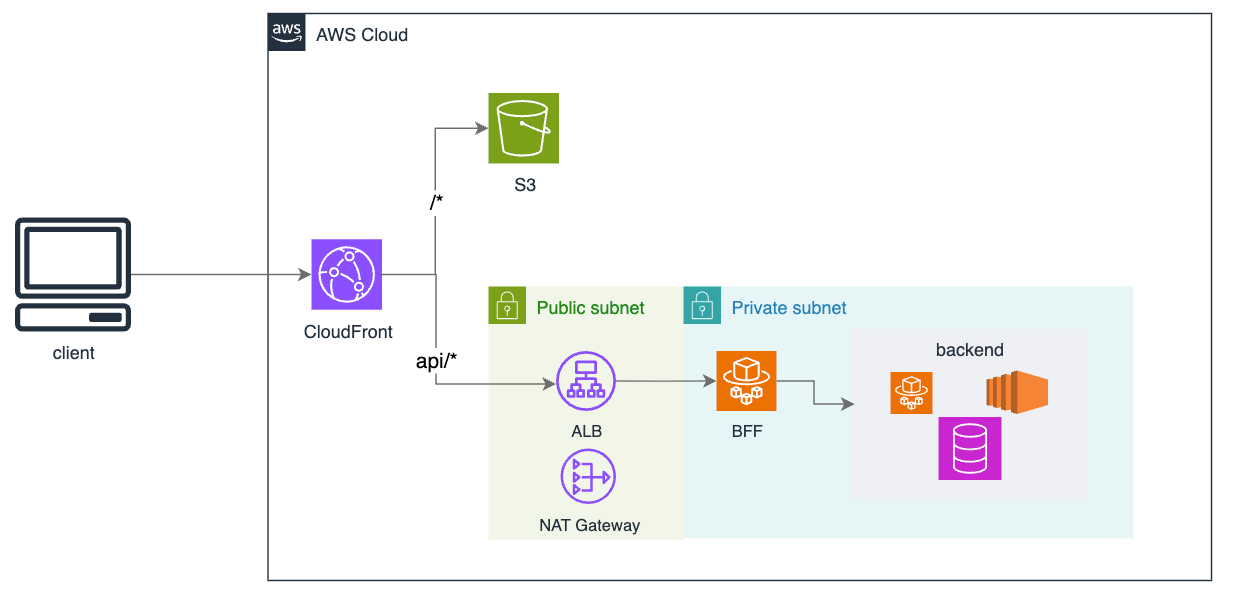
How It Works
CloudFront is your single entry point. It uses “behaviors” to route traffic:
/*→ S3 (your static frontend)api/*→ ALB (your backend)
S3 hosts your built frontend assets. CloudFront caches them at edge locations globally.
ALB receives /api/* requests and forwards them to Fargate. It lives inside your VPC.
Fargate runs your BFF. This is where OAuth happens, sessions are managed, and requests are proxied to your internal APIs with access tokens attached.
Redis stores sessions. The BFF is stateless — session data lives here so you can scale horizontally.
Internal APIs are your actual backend services. They have no public endpoints. Only the BFF can reach them.
The Request Flow
User loads
app.example.com→ CloudFront serves static assets from S3App calls
app.example.com/api/orders→ CloudFront routes to ALBALB forwards to Fargate (BFF)
BFF looks up session in Redis, gets access token
BFF calls internal API with token attached
Response flows back to browser
The browser only ever sees a session cookie. Tokens stay server-side.
Why CloudFront Behaviors?
You might think you need an ALB in front of everything to do the routing. You don’t.
CloudFront handles it natively, and you get:
Free data transfer from S3
Edge caching for static assets
DDoS protection included
Lower cost than ALB-first architecture
Key Configuration Details
CloudFront behavior paths: Use api/* not /api/*. No leading slash.
Restrict ALB access: Add a custom header in CloudFront (e.g., X-Origin-Verify: secret-value). Configure ALB to reject requests without it. This prevents bypassing CloudFront.
S3 Origin Access Control (OAC): Configure CloudFront with OAC so users can only access static assets through CloudFront, not directly via the S3 URL. This ensures caching is always used and the origin is secured.
Redis for sessions: Don’t store sessions in Fargate memory. When requests hit different tasks, sessions disappear. Always use external session storage.
Handling SPA Client-Side Routing
If you’re using React Router, Vue Router, or similar, you’ll hit a common problem: user refreshes on /dashboard/settings and gets a 404.
Why? S3 looks for a physical file at /dashboard/settings. It doesn’t exist. S3 returns 404 before your SPA can handle the route.
The fix: Configure CloudFront to catch 404 errors from S3 and return /index.html instead. Your SPA loads, reads the URL, and routes correctly.
In CloudFront, go to Error Pages and create a custom error response:
HTTP Error Code: 404
Response Page Path:
/index.htmlHTTP Response Code: 200
Cookie Settings
This setup enables the strictest possible cookie configuration because everything is on the same domain.
Set-Cookie: session=abc123; HttpOnly; Secure; SameSite=Strict; Path=/apiWhat each flag does:
HttpOnly— JavaScript can’t read the cookie. XSS can’t steal it.Secure— Only sent over HTTPS.SameSite=Strict— Only sent on same-site requests. Strongest CSRF protection.Path=/api— Cookie only sent to BFF endpoints, not with static asset requests.
Why same domain matters: If your frontend and BFF are on different domains (e.g., app.example.com and api.example.com), you’re forced to use SameSite=None, which is weaker and increasingly blocked by browsers.
With CloudFront serving both app.example.com/* and app.example.com/api/*, you’re same-origin. SameSite=Strict just works.
That’s It
This architecture handles most production workloads. It’s secure by default — your internal APIs have no public exposure, tokens never reach the browser, and CloudFront gives you edge caching and DDoS protection for free.
Start here. Add complexity only when you need it.